
PRODUCTION ASSET QA & PREFLIGHT SYSTEM
Catch pipeline problems before they become production problems.
Studio Asset Preflight helps artists and production teams validate assets before they enter the production pipeline.
Check naming, structure, studio rules and delivery requirements against a defined production standard — then see exactly what failed, why it failed and what needs to be fixed.
- Validate earlier
- Save time
- Reduce rework
- Keep standards
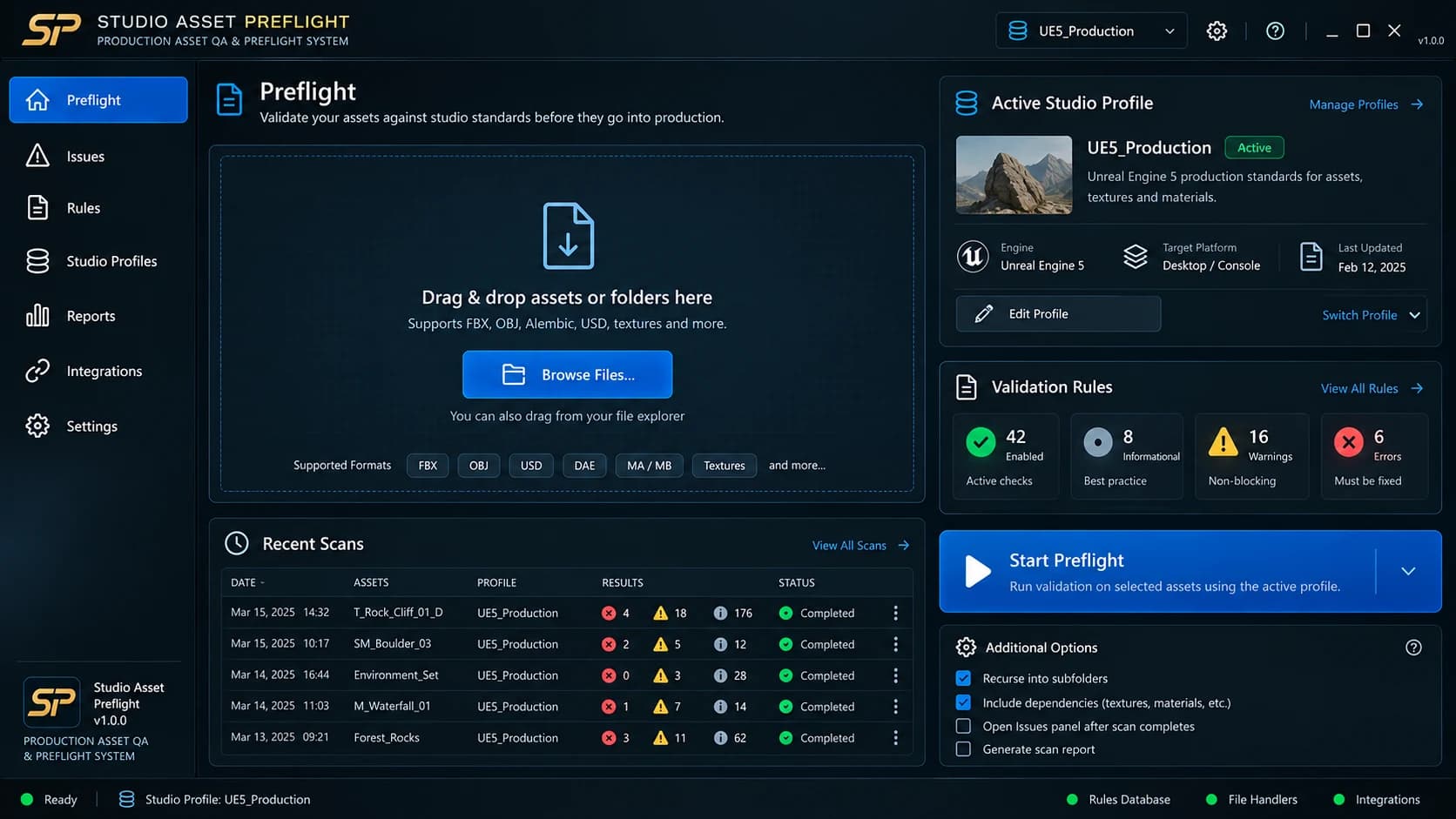
Concept preview. Demo data.
Core capabilities
Studio Profiles
Define your studio's standards once. Use them across the team.
Issue Inspector
Clear, actionable feedback to fix problems fast.
Workflow
Validate assets with a simple, repeatable process.
Integrations Roadmap
Built for modern DCC-to-engine workflows, with more tools on the way.
FROM ASSET TO APPROVED
A cleaner pipeline, step by step.
Validate assets before they enter production, with a workflow designed for real teams.
1.Add Assets
Drag & drop your files or folders.
2.Select Profile
Choose a studio profile or use a custom one.
3.Run Preflight
Automatically validate against your standards.
4.Review Issues
Get clear, actionable feedback.
5.Fix & Re-scan
Make changes and revalidate.
6.Ship with Confidence
Clean assets, fewer surprises, smoother production.
STUDIO PROFILES
Define your studio standards once. Validate every asset consistently.
A Studio Profile is your executable production standard — the Naming, Rules, Aliases and Validation Settings your assets are checked against, defined once and used across the team.
One production standard
Every asset is validated against the same defined standard.
Rules you can point to
Each check is a Rule, so a result is never a mystery.
Consistent results
The same standard applies to every asset in the pipeline.
STUDIO PROFILE
Your executable production standard
- Naming
- Rules
- Aliases
- Validation Settings
- PASS
- WARN
- FAIL
ISSUE INSPECTOR
See exactly what failed.
Then see why it failed and what needs to be fixed.
Every issue in the Issue Inspector shows the Rule that was checked, the Problem, the Actual and Expected results, why it matters and a Suggested Action — clear, actionable feedback to fix problems fast.
Issue Inspector
Illustrative structure- Rule
- The Rule from your Studio Profile that was checked.
- Problem
- What the Rule flagged in the asset.
- Actual
- What was found in the asset.
- Expected
- What the Studio Profile requires.
- Why this matters
- Why the Rule exists in your production pipeline.
- Suggested Action
- What needs to be fixed.
Illustrative structure only. No scan data shown.
PHYSICAL MATERIAL QA
PRODUCT VISION — IN DEVELOPMENTYour PBR maps can exist and still be wrong.
Studio Asset Preflight is designed to go beyond texture presence checks. Physical Material Validation will analyze relationships and value ranges across Base Color, Roughness, Metallic, Normal and related maps to highlight material properties that may fall outside expected physical behavior.
Compare assets against configurable material reference profiles for surfaces such as concrete, metals, wood, stone, plastics and more.
WEATHERED CONCRETE
Physical Material QA
- Base ColorPASS
- ReflectancePASS
- MetallicPASS
- RoughnessWARNING
- NormalPASS
- AO ContaminationPASS
- Baked LightingWARNING
2 warnings detected
Roughness
Median roughness is below the expected range for the selected Weathered Concrete reference profile.
Base Color
Possible directional lighting detected. Review for baked illumination.
Illustrative concept — analysis engine in development.
Reflectance Analysis
Identify Base Color values that fall outside configured physical reference ranges.
Metallic / Dielectric Validation
Detect material behavior that conflicts with the selected material class.
Roughness Plausibility
Compare surface response against the expected roughness behavior of the reference material.
Cross-Map Consistency
Analyze the texture set as one material instead of isolated files.
Lighting Contamination Detection
Flag potential baked lighting or AO contamination in maps intended to remain lighting-neutral.
Studio Material Profiles
Adapt physical QA thresholds and tolerances to your own production standards.
Structural QATexture QAPhysical Material QAEngine Compliance
INTEGRATIONS ROADMAP
Built standalone. Designed to go inside the engine.
Studio Asset Preflight starts as a standalone Production Asset QA & Preflight System, designed to validate assets before they enter production. Native inside-engine workflows are planned for future releases, beginning with Unreal Engine integration and expanding toward Unity support.
Unreal Engine
Core FocusPrimary engine integration direction, with native in-editor preflight and asset validation workflows planned.
Unity
PlannedPlanned engine-side preflight and asset validation workflows for Unity production pipelines.
Blender
PlannedPlanned add-on and export/preflight bridge.
Maya
PlannedPlanned scene validation and export pipeline integration.
Substance 3D Painter
PlannedPlanned texture-export and naming validation workflow.
Pipeline Tools
FutureFuture direction may include:
Perforce / Git / Jenkins / ShotGrid / CI/CD
These are future direction, not current integrations.
Studio Asset Preflight is standalone-first. Integration statuses describe product direction, not current availability.
USE CASES
Built for every team in the pipeline.
Game Development
Catch asset problems before they affect engine integration and downstream production.
Outsourcing & External Teams
Validate deliverables against the same standards used by the internal team.
Cinematics & Virtual Production
Apply repeatable asset QA before assets move into production environments.
Indie & Small Teams
Standardize asset checks without building an internal pipeline tool from scratch.
FAQ
Frequently asked questions.
What is Studio Asset Preflight?
Studio Asset Preflight is a Production Asset QA & Preflight System designed to validate assets against defined studio or project standards before they enter production.
Is this only a naming validator?
No. Naming is one part of a broader production preflight workflow built around Studio Profiles, validation rules and explainable issue reporting.
What is a Studio Profile?
A Studio Profile is your executable production standard — the naming, rules, aliases and validation settings used during preflight.
Does Studio Asset Preflight automatically fix assets?
The initial product direction prioritizes reliable detection, explanation and validation. Automatic fixes will only be introduced where they can be implemented safely and predictably.
Which DCC applications and engines are supported?
Studio Asset Preflight is being developed standalone-first. Unreal Engine is the primary engine integration direction, with Unity and additional DCC and pipeline integrations planned progressively. The Integrations Roadmap above describes product direction, not current availability.
Is Studio Asset Preflight available now?
The product is currently in development. Join Early Access to follow progress and be considered for future testing.
PRIVATE BETA
Help test Studio Asset Preflight.
We're inviting a limited group of Unreal Engine artists and developers to test Studio Asset Preflight 0.1.0 in real production workflows.
Applications are reviewed individually. Selected testers receive private access to RC5 builds and documentation.
Windows · Unreal Engine 5.6–5.8